How we build Knit
Our commitment to accessibility
Knit connects people through the phones they already carry. That only works if everyone can use it, so we build the Android app around TalkBack, the text size you choose and the motion settings already on your phone.

By Jeff Mixon ·
Knit exists to connect people. Phones running it pass messages to one another, hop by hop, without a cell signal, a Wi-Fi network or an account.
Each of those phones also carries messages for the people around it, which means the mesh gets stronger with every person who can use the app.
When someone can't get through setup or can't tell whether a message arrived, they miss the conversation. Everyone nearby also loses a phone that would have carried their messages.
Every connection Knit makes starts with one person and the app in their hand, so accessibility is part of how we build every screen. This is where the Android app stands today, how we check it, and what we haven't done yet.
Designed for TalkBack
TalkBack, Android's screen reader, speaks what's on screen and lets you move through it by swiping. We design each of Knit's screens for how it sounds as well as how it looks.
In your chat list, each conversation is a single stop. TalkBack reads it as one sentence: who it's with, the latest message, when it arrived, whether yours was delivered and how many messages you haven't read. Deleting a conversation is in TalkBack's actions menu, so you don't need to find a long-press.
Setup reads the same way. Each page has a heading you can jump to, the progress dots read as "Step 2 of 3", and each permission button names the permission it asks for. In Settings the whole row works as the switch, and TalkBack announces it as one. Icons that only repeat the words beside them stay silent, so you don't hear everything twice.
Default text


Text at 200%
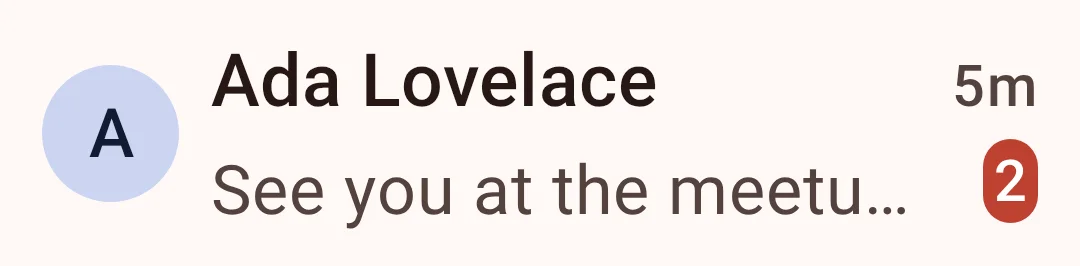
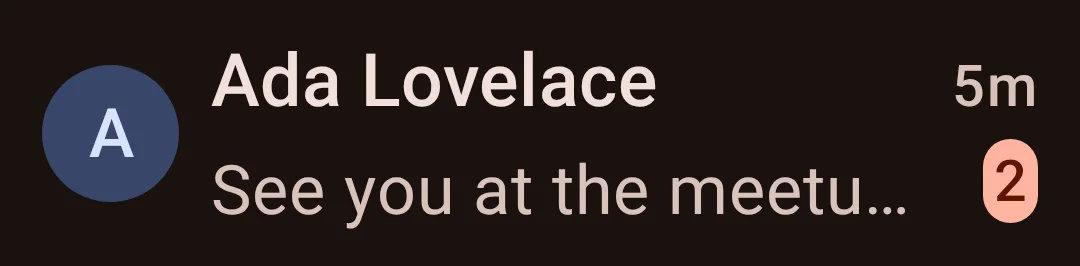
TalkBack reads
"Ada Lovelace, See you at the meetup tonight!, 5 minutes ago, 2 unread messages"
Delivery ticks, in words
On a mesh, a message can take a while to find its way, and the tick beside it is how you know it arrived.
Knit gives every tick words. TalkBack says Sent or Delivered, and in a group it says how many members have the message, such as "Delivered to 3 of 5", which a double tick can't show on its own. If a message travelled through an Internet relay or a Meshtastic radio, both of which are optional, TalkBack names the route too.
The status line at the top of a chat reads as a full sentence as well, so you never have to judge a coloured dot to know whether a relay or radio you've added is connected.
| On screen | TalkBack says |
|---|---|
| "Sent" | |
| "Delivered" | |
In a group of five | "Delivered to 3 of 5" |
Through a Meshtastic radio | "Delivered over LoRa" |
Through an Internet relay | "Delivered over the Internet" |
Voice messages without holding a button
Recording a voice message usually means pressing and holding the microphone, a gesture that doesn't work with a screen reader. With TalkBack on, a double-tap on the microphone starts a recording that keeps going on its own, and a Stop button ends it.
A voice message is announced with its length, and play and pause are named buttons. Locking, cancelling and stopping a recording each give a short vibration, so you can tell what happened without looking.
Text at the size you set
Knit's text follows the size you pick in Android's settings. Rows grow taller to hold larger text, and screens that would otherwise push a button off the bottom scroll instead, which keeps setup and the direct file transfer prompt usable at large sizes.
Icon buttons and the profile pictures you can tap are at least 48 dp across, the size Android's guidelines recommend. On a hardware keyboard, Ctrl+Enter sends.
We test colour too. Every colour Knit gives a contact's profile picture is checked against WCAG AA's 4.5:1 contrast ratio for text, in light and dark, and again after Material You tints it toward your wallpaper. The green that marks someone online or verified meets the 3:1 ratio WCAG sets for graphics.
Less movement on screen
Movement on screen can be distracting or make people feel unwell, which is why Android has a Remove animations setting. Knit follows it the moment you change it: screen transitions become instant and loading placeholders stop pulsing.
Knit doesn't add a separate switch for this, because you've already told your phone what you want.
How we check our work
Knit's test suite runs more than twenty of its screens through Google's Accessibility Test Framework, the same checks behind Google Play's pre-launch report. It flags controls without a name and touch targets that are too small, and on a physical phone it also flags text without enough contrast. Any error fails the test.
Faster tests run automatically in the app's build pipeline. They confirm that a chat row reads as one sentence, that headings are marked as headings and that colours keep their contrast.
The checks still find things. In October they caught that every Accept button on the message requests screen read as just "Accept", without saying whose request it was, and that coral names and links in light-mode chat bubbles fell just short of 4.5:1. Both are fixed in Knit's source on GitHub, ahead of the next release.
Knit for iPhone, built to the same standard
Knit for iPhone is in development, and we're building it the same way. Its interface tests run Apple's accessibility audit over every screen planned for the first version, then again at the largest text size and again in dark mode. A change that fails the audit doesn't go in.
The first time we switched that audit on, it found more than a hundred problems. Fixing them gave the iPhone app colours that meet WCAG AA contrast and layouts that rearrange themselves at the largest text sizes.
Still on our list
These are the gaps we know about. We'd rather name them here than have you run into them.
Transcripts for voice messages
Voice messages are audio only for now. Until they have transcripts, a typed message is the way to reach someone who can't listen to one.
Descriptions for photos
TalkBack announces a photo as a photo attachment, and there's no way yet to describe what it shows.
New messages, announced
TalkBack doesn't announce a message as it arrives in the chat you have open. You hear it when you move to it.
More languages
Knit is in English only for now.
Tell us what gets in your way
People who use TalkBack, Switch Access or large text every day notice things no automated check will. If Knit gets in the way of how you use your phone, open an issue on GitHub and tell us what happened. A mesh works because people's phones help each other, and we want everyone to be able to join in.
- Report an accessibility problem →
Open an issue on Knit's GitHub tracker. Say what you were trying to do, and what got in the way.
- Explore Knit's source (GPLv3) →
Read the Android app's accessibility tests, and the code that decides what TalkBack says on each screen.
Knit is free and ad-free. Contributions are what pay for the next one of these: Ko-fi, Liberapay or GitHub Sponsors.